Last month our community suffered a terrible tragedy. The crash site of Flight 3407 was only 10 minutes from my home, and because of their proximity to the site, one of my best friend's family was displaced from their home for more than 3 weeks. This kind of disruption is difficult at best and immobilizing at worst. And of course, the losses that were endured by all of the families with relatives and friends on that plane, as well as the family whose home was hit, goes beyond measure. When things like this happen, we feel powerless to do anything to help ourselves feel better. And while it is unlikely that most of us will experience a disaster of this magnitude, we are may be more likely to experience the sudden illness of a loved one, or some other circumstance which requires us to have important supplies and information at our fingertips.
In the moment of an unexpected emergency we react automatically, without thought or hesitation. For example, my friend told me that in the moment of the crash she was so shocked into concern for her children's welfare that she ran throughout the house with knitting yarn wrapped around her feet in a kind of winding Dennis the Menace path. She was not even aware this was happening until much later. Due to time pressure or shock, we may not be able to think clearly or have time to plan the right course of action. It is only after something like this happens that it reminds us how important it is to have a list of items we may need to gather quickly and get out with. Professional Organizer's are familiar with the importance of this issue and can help you with information, resources, and hands-on help. This 2006 Press Release from NAPO Organizer, Liz Canavan, provides a good summary of important things to think of when planning ahead. Although it is overwhelming to consider planning for every possible contingency, organizing your irreplaceable documents may be a great place to begin, and Liz encourages people to do a little at a time. Also see my November 2008 Tip: Permanent Record Storage for details on that project.
Although many of my readers live in New York, I am going to point you to a resource Liz mentions, called Ready Colorado, which has a website filled with information about emergency preparedness, along with checklists and personal profiles that you can print out, complete essential information and make it available to family and friends. I have added it to my list of Things to Do Someday!
Lastly, I have an Important Words form on my website that helps users to keep track of all of those pesky passwords and user names. With all the different requirements each site has, one can easily end up with a hundred words. This form makes it a little easier to remember. Keep it filed in a safe place where others won't see it, and place a copy (update it periodically) in a fire proof file box (which you will hopefully get to organize your documents) or with a trusted relative/friend. This is not only helpful in an emergency, but just for everyday use. I use mine all the time.
A little preparation goes a long way.
Thursday, March 12, 2009


Thursday, February 12, 2009
Four Quick Kitchen Tips for February!

It feels like I spend most of each day in the kitchen. That may be exaggerating, but it sure feels like it. I have to admit, cooking is not really one of my best skills. It is especially difficult when the day is busy and the kids need my attention after their own long days. I am always looking for ways to simplify things for myself. These are a few ideas that I have discovered that have made my life easier and I hope they help you, too!
Be sure to also visit last year's Four Quick Tips for February!
- When you are stuck for dinner ideas, try www.supercook.com. On this site you can list ingredients you have on hand in the kitchen and it will give you multiple ideas for recipes to consider. A really cool feature is that you can enter the number of servings you want to make and it will adjust the recipe accordingly with a quick click! If you sign up with a username and password, you can save your recipes. A few nights ago, I made Ranchero Omelettes! They were delicious. I typed in cheese and eggs, and it offered me many choices. It said I also needed beans and salsa or diced tomatoes and I had those! It was so easy.
- Next time you clean out your refrigerator and freezer, try getting out your label maker and labeling the shelves or doors. Clean up is so much easier, finding things a breeze, and it's easy to tell when you are out of something or have doubles!
- I really like my Hassle Free Dinners program. It is something I bought at the National Association of Professional Organizers conference two years ago and it is a great program. It was developed by a Home Economist, turned Professional Organizer. It comes on a CD (the only hassle is having to print off the recipes) and includes a complete meal for every day of the year, broken down into 52 weeks and color coded by day. Following each week is a shopping list of all the ingredients needed for each meal, also color coded, so if you only want to make a few of the meals, you can tell what and how much to buy. Each recipe is quantified for 2, 4 and 6 servings. What I like about it is that the meals are easy and healthy. There is a great variety, and she puts things together in unusual ways. For example, this week we had Italian Bean Salad, which had tuna, red onion, Cannellini beans, balsamic vinegar, oil, parsley and grape tomatoes, all mixed together and served over lettuce greens with hearty bread. Very yummy.
- For anyone shopping at the Williamsville, NY Sheridan Dr. Wegmans, visit my website Organizing Toolbox page, scroll to the bottom under "Other Useful Forms" and see my Wegman's shopping list. It is organized by aisle and has many commonly purchased items. I make copies and put a new one each week on the refrigerator. When I run out of an item, I circle it on the list, and others in the family can easily add to it, too.
Saturday, January 10, 2009
Beating Back the Inbox, Part 2:
Last month I wrote about setting up rules to deal with the mass of incoming messages to your e-mail inbox. This month I will describe a method of organizing the box into folders to deal with messages efficiently. It will work best if you set up the rules first (see last month: Beating Back the Inbox, Part 1), then the folders. Here is how to set up a folder in Microsoft Outlook.
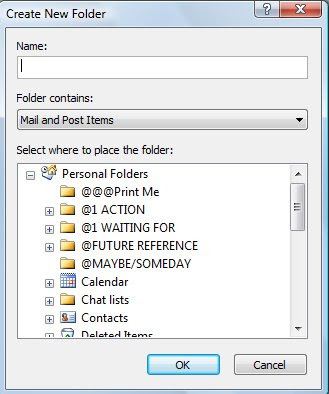
It is best to put major categories in the Personal Folders sections, and then you can create subfolders if you want within those categories.
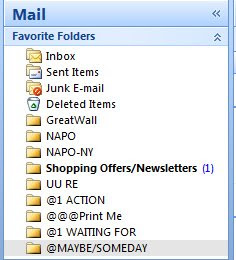
You can add any of these folders to you “favorite folders” box, by right clicking and then clicking “add to favorite folder”. It will now show in your Favorites box.
Below is a screen shot of my favorite folders. I have created the following categories in my favorites:
I have another folder (not shown in my favorites), called “FOR FUTURE REFERENCE”. This folder is where I keep information that I want to have long term, but don’t use often. I created subfolders for Work and Home; and inside those, further broken down by broader topics. These can get overloaded just like regular hard files in a cabinet, and would benefit from occasional purges.
I hope these ideas are helpful to you in organizing your Inbox. For personal attention with this or any other task, simply call Linda.
This article may be reprinted or reposted on a non-exclusive basis provided Linda Groat's name and contact information is included.
- On the File menu, point to New, and then click Folder.
- In the Name box, enter a name for the folder.
- In the Folder contains box, click the type of folder you want to create.
- In the Select where to place the folder list, click the location for the folder.

It is best to put major categories in the Personal Folders sections, and then you can create subfolders if you want within those categories.
You can add any of these folders to you “favorite folders” box, by right clicking and then clicking “add to favorite folder”. It will now show in your Favorites box.
Below is a screen shot of my favorite folders. I have created the following categories in my favorites:

- @1 Action: This is where I put anything I need to act on. I only put things here that I cannot complete in two minutes or less (these I try to do when I am reading my e-mail), and I force myself to ALWAYS make a note in my planner that the item needs attention. In addition, I usually check this frequently (every couple of days) so I don’t forget about anything.
- @@@Print Me: This is where I put items that I need to print in the future (this is useful if you have a remote printer). I go through this folder about once a week.
- @1 WAITING FOR: This is a folder for items that I have replied to or requests I have sent out that I am waiting for a response on. If I get messages related to an internet order or other project, I put them in here. If I have asked someone for something I BCC myself (just put your e-mail in the BCC box and it will send a copy to you without showing up on the other person’s message) and then I put my copy in my WAITING FOR file. This is a great way to remind myself what I have asked others for (and when I asked). Subfolders could be created for multiple people. I go through this folder about once a week.
- @Maybe/Someday: This is where I keep things that I might do someday, or really don’t have time to decide about right now. Once in a while I go through this file and delete what I no longer need. This is a great way to put things “out of sight” but not lose them, and definitely not print them, unless I need to.
I have another folder (not shown in my favorites), called “FOR FUTURE REFERENCE”. This folder is where I keep information that I want to have long term, but don’t use often. I created subfolders for Work and Home; and inside those, further broken down by broader topics. These can get overloaded just like regular hard files in a cabinet, and would benefit from occasional purges.
I hope these ideas are helpful to you in organizing your Inbox. For personal attention with this or any other task, simply call Linda.
This article may be reprinted or reposted on a non-exclusive basis provided Linda Groat's name and contact information is included.
Thursday, December 4, 2008
Beating Back the Inbox, Part 1:
Do you open up your e-mail and find countless new messages? If you belong to a few list serves or online groups, the daily chatter can sometimes be overwhelming. Also, if you shop online, the websites you use like to fill your box up with lots of advertisements and sales.
An easy way to deal with those pile ups is to set up folders to receive the messages according to sender, and to create a "rule" to automatically place incoming messages into the appropriate folder so you can deal with them later. If you have one person who constantly sends you jokes or other forwarded messages, you can create a rule for messages from that person and you can review these message when/if you have time.
Here is a screen shot of my folders that I set up in my Inbox. I use Microsoft Outlook 2007.

Shown are folders for several list serves that I belong to, and a categoryI created for Shopping Offers/Newsletters and other stuff (non-urgent items which I can review and discard in bulk at a later time).
Here are the basics on how to do it, using Outlook 2007. This information was obtained from the following link on www.office.microsoft.com . If you follow the link, you will see additional information on other variations of creating rules.
Using Yahoo Mail? Click here to learn about Filters.
I also create folders for items that I need to keep or follow up on and manually move messages into them. I will expand on those folder uses next month.
An easy way to deal with those pile ups is to set up folders to receive the messages according to sender, and to create a "rule" to automatically place incoming messages into the appropriate folder so you can deal with them later. If you have one person who constantly sends you jokes or other forwarded messages, you can create a rule for messages from that person and you can review these message when/if you have time.
Here is a screen shot of my folders that I set up in my Inbox. I use Microsoft Outlook 2007.

Here are the basics on how to do it, using Outlook 2007. This information was obtained from the following link on www.office.microsoft.com . If you follow the link, you will see additional information on other variations of creating rules.
How to Create a rule from a message
You can create a rule directly from a message. For example, you can create a rule to move messages from someone to a specific folder.
- Right-click the message that you want to base the rule on, and then click Create Rule on the shortcut menu.
In the Create Rule dialog box, select the check boxes for the options that are already filled in with information from your selected message.
- Select the Move the item to folder check box.
- Click an existing folder or click New to create a new folder to store the messages.
- To add more conditions, actions, or exceptions to the rule, click Advanced Options, and then follow the rest of the instructions in the Rules and Alerts Wizard.
Tip To run the rule as soon as you create it, select the Run this rule now on the messages already in folder check box on the last page of the Rules and Alerts Wizard.
All the messages in your Inbox, or any folder that you choose, that meet the conditions and exceptions associated with the rule are moved to the specified folder. To test your new rule, open your new folder. Were the correct messages moved?
Using Yahoo Mail? Click here to learn about Filters.
I also create folders for items that I need to keep or follow up on and manually move messages into them. I will expand on those folder uses next month.
Wishing you all a very Happy and Healthy Winter Holiday Season and a Happy New Year!
If you need help with organizing, simply call Linda!
This article may be reprinted, shared, forwarded or re-posted on a non-exclusive basis as long as Linda Groat's name and contact information is included.
Previous month’s tips can be viewed at www.simplybacktobasics.com and at www.simplybacktobasics.blogspot.com .
You may unsubscribe from this tip by sending me an e-mail with “remove from list” in the subject line.
Saturday, November 8, 2008
Permanent Record Storage; Not Urgent; but Important!
One of the things I usually find when I help people organize their home records is that many do not have a permanent home for their most important documents. Birth/marriage/death certificates, life insurance policies and passports are often mixed in with bills, car repair records and appliance manuals. Renting a safety deposit box is certainly one option for keeping these documents safe and provides secure storage in the event of a fire or theft; however; there is the added yearly cost and the need to go somewhere else to access any needed documents.
Another convenient option is to purchase a fireproof storage file box, like this one available from Target. The price here is listed about $100; however; I have purchased it at my local Target for around $45. It accommodates hanging files in a built in frame, which is very handy for finding what you need. It can be locked, if desired, and stored in the basement or a closet. It will protect documents for a specified amount of time from fire, and flood-proof boxes are available, as well. Be sure to check the label of the box before you purchase to make sure you get the one that will best meet your needs. Once you have purchased the file box, you can organize your records. Internal file folders are not necessary if you are using hanging files and will add bulk to your files. Just use one hanging file per topic. Print labels using your label maker to make it look sharp and professional. Here are some suggested organizational groupings.
• Adoption Papers
• Certificates (here you can group Birth Records, Marriage Certificates, Death Certificates, Business Certificates or DBA, Tax numbers, social security cards, professional certificates, jewelry appraisals, diplomas, loan payoff statements, automobile titles)
• House Deed/purchase information
• Important Stuff (passwords, copies of wallet contents, personal letters/Momentos)
• Letters to Children (written when they are small to be opened at some future date)
• Life Insurance Policies
• Passports
• Evaluations & Reports (psychological/education testing records)
• Resumes
• Trusts
• Wills/Health Care Proxy/Living Will/ Power of Attorney (for yourself and any other family members you may need to assist)
This list is merely a guideline and will be different depending on each person’s circumstances, but it gives you a starting point. I will never forget how about 10 years ago, I found that I was missing my husband’s car title, two years after its purchase, because I was purging my files and setting up my permanent record files and realized it was not there. It turned out that the dealership never sent it to us, but I would not have known that had I not been purging the unneeded info and sorting things out.
Wishing you all a very Happy and Healthy Thanksgiving Holiday!
Another convenient option is to purchase a fireproof storage file box, like this one available from Target. The price here is listed about $100; however; I have purchased it at my local Target for around $45. It accommodates hanging files in a built in frame, which is very handy for finding what you need. It can be locked, if desired, and stored in the basement or a closet. It will protect documents for a specified amount of time from fire, and flood-proof boxes are available, as well. Be sure to check the label of the box before you purchase to make sure you get the one that will best meet your needs. Once you have purchased the file box, you can organize your records. Internal file folders are not necessary if you are using hanging files and will add bulk to your files. Just use one hanging file per topic. Print labels using your label maker to make it look sharp and professional. Here are some suggested organizational groupings.
• Adoption Papers
• Certificates (here you can group Birth Records, Marriage Certificates, Death Certificates, Business Certificates or DBA, Tax numbers, social security cards, professional certificates, jewelry appraisals, diplomas, loan payoff statements, automobile titles)
• House Deed/purchase information
• Important Stuff (passwords, copies of wallet contents, personal letters/Momentos)
• Letters to Children (written when they are small to be opened at some future date)
• Life Insurance Policies
• Passports
• Evaluations & Reports (psychological/education testing records)
• Resumes
• Trusts
• Wills/Health Care Proxy/Living Will/ Power of Attorney (for yourself and any other family members you may need to assist)
This list is merely a guideline and will be different depending on each person’s circumstances, but it gives you a starting point. I will never forget how about 10 years ago, I found that I was missing my husband’s car title, two years after its purchase, because I was purging my files and setting up my permanent record files and realized it was not there. It turned out that the dealership never sent it to us, but I would not have known that had I not been purging the unneeded info and sorting things out.
Wishing you all a very Happy and Healthy Thanksgiving Holiday!
If you need help with organizing, simply call Linda!
This article may be reprinted, shared, forwarded or re-posted on a non-exclusive basis as long as Linda Groat's name and contact information is included.
Previous month’s tips can be viewed at www.simplybacktobasics.com and at www.simplybacktobasics.blogspot.com .
Wednesday, October 8, 2008
Simply Access Your Credit Report!
In order to stay on top of your personal credit, you need to see what is on your report. Inaccuracies can include incorrect names, addresses, social security numbers, erroneous accounts, etc. Also, you may have opened accounts you no longer need or want. In order to monitor your credit, you need to access your Credit Report on a regular basis. If you find problems, information can be disputed and corrected using the process detailed by the credit bureau. The following information was obtained from the Privacy Rights Clearinghouse Website, and you can visit the site for more details.
“Thanks to the federal FACT Act, consumers nationwide are now able to get a free copy of their credit report annually from each of the three credit bureaus - Equifax, Experian, and TransUnion (FCRA sec. 612 (a)(1)(A)&(B)).
To order your free reports, you can call the official toll-free number, (877) 322-8228. You can also go online to www.annualcreditreport.com where you can order your reports directly. Or you can print out the form and mail your request. https://www.annualcreditreport.com/cra/requestformfinal.pdf
The World Privacy Forum has released a study that indicates that privacy-conscious consumers may be better served by ordering their credit reports by phone or mail rather than online. See www.worldprivacyforum.org/calldontclick.html for more details.
For more information about access to free credit reports, see the Federal Trade Commission's Facts for Consumers at www.ftc.gov/bcp/conline/pubs/credit/freereports.htm.
You are not required to order all three credit reports at the same time. If you wish, you can stagger your free reports over the course of a year by ordering one report every four months. This way, you are monitoring your credit reports on an ongoing basis. But if you are an identity theft victim or are shopping for credit, it is best to order all three at one time.”
Immediate access to online reports can be obtained by going to www.annualcreditreport.com and completing the questions for each of the three bureaus. I would recommend filling out the form by mail, unless you require immediate access, as it can be difficult to print out the reports (they can be very lengthy, depending on your history and likely will use up lots of ink). I tried to copy and paste mine into Word Docs, but they were not formatted properly and it was very aggravating. Also, online reports can only be accessed for 30 days from the date of the request, and once you access online, a hard copy will not be sent unless you pay for it (approximately $10-15 each). Anyway, all said, it seems easiest to order it by phone or snail mail and then you have a nice hard copy to refer to.
Too Many Credit Offers Cluttering Up your Mailbox?
Don’t forget you can register at www.OptOutPrescreen.com; the official website for the Consumer Credit Reporting Industry to accept and process requests from consumers to Opt In or Opt Out of firm offers of credit and insurance , or call 1-888-5OptOut (1-888-567-8688) to opt-out of these offers.
Too Many Solicitors Interrupting Your Dinner?
Here’s a GREAT tip…. If you get annoying calls from pre-recorded solicitors, try pressing 3 during the message. Many times it will delete you from the database (you have to answer the call to make it work). I tried this with the auto dealership where I bought my car (but no longer go to – and haven’t for about 8 years) but which insists on calling me every so often to “remind” me to bring it in, and imagine my satisfaction when I heard “Thank you, you have been removed from the database”! Now I am waiting for those calls so I can PRESS 3!!! Incidentally, when a "live" solicitor calls you, you can politely thank them and request to be removed from list, which also seems to work, but isn't as much fun. :)
If you need help with organizing, simply call Linda!
This article may be reprinted, shared, forwarded or re-posted on a non-exclusive basis as long as Linda Groat's name and contact information is included.
Previous month’s tips can be viewed at www.simplybacktobasics.com and at www.simplybacktobasics.blogspot.com .
Unsubscribe by sending me an e-mail with “Please remove from list” in the subject line.
Wednesday, September 10, 2008
Downsize your “To Do”!
For me, September always seems like the busiest month of the year. This year is no different, and in fact it feels busier than ever. Adjusting to new schedules, schools and activities, as well as the end of the summer celebrations and picnics takes mental and physical energy. With the addition of Megan Ling to our family, we seem to have so much more to remember and prepare for. She now has preschool and 4 different types of therapies so we have lots of appointments. Also, I have started back to work, organizing clients again, so life is very busy. My spare minutes for tasks like tip writing (or really any activity that needs devoted attention time) are so limited. Plus, I acquired an additional cat (this makes a total of 3 in my house), as I offered a temporary home to kitten in need.
My expectations are constantly challenged due to all of the demands on my time. I know that many of you can relate to this and are in the same position; although your “To Do” list may have different items on it.
So my tip for this month is that it’s okay if you allow yourself to make a choice to let some things go for the time being, to avoid overload. For the last several years I have been practicing the skill of simplifying my expectations and obligations. Dropping obligations means to really examine the types of things you are filling your schedule up with. If you look at them honestly, you may find that the activities you have filled your time up with are not really filling your heart with gladness and joy. If you find you are dreading going to something or dragging kids with you to these activities, it may be time to explore their place in your life.
Parents are often surprised to hear me say that children DO NOT have to participate in outside activities in order to be happy and successful. In fact, running kids around to too many activities can interfere with their ability to find ways to entertain themselves and get along with others. Many kids benefit from unstructured time to explore their own interests and friends (along with a healthy limit on media time). John Rosemond’s books can provide lot of further reading ideas and information on this topic.
Having lots of ideas and goals is terrific and can be very motivating. However, if you consistently find that you are falling short of your goals and feeling behind. It may be time to reevaluate, downsize.
I have several home projects and activities that I would love to accomplish, and there are numerous outside committees and groups I could give input to. But right now I know that is not and cannot be my priority. I realize that this is not the time, and so I have let go of the pressure on myself, which feels a lot better.
You can do it, too.
My expectations are constantly challenged due to all of the demands on my time. I know that many of you can relate to this and are in the same position; although your “To Do” list may have different items on it.
So my tip for this month is that it’s okay if you allow yourself to make a choice to let some things go for the time being, to avoid overload. For the last several years I have been practicing the skill of simplifying my expectations and obligations. Dropping obligations means to really examine the types of things you are filling your schedule up with. If you look at them honestly, you may find that the activities you have filled your time up with are not really filling your heart with gladness and joy. If you find you are dreading going to something or dragging kids with you to these activities, it may be time to explore their place in your life.
Parents are often surprised to hear me say that children DO NOT have to participate in outside activities in order to be happy and successful. In fact, running kids around to too many activities can interfere with their ability to find ways to entertain themselves and get along with others. Many kids benefit from unstructured time to explore their own interests and friends (along with a healthy limit on media time). John Rosemond’s books can provide lot of further reading ideas and information on this topic.
Having lots of ideas and goals is terrific and can be very motivating. However, if you consistently find that you are falling short of your goals and feeling behind. It may be time to reevaluate, downsize.
I have several home projects and activities that I would love to accomplish, and there are numerous outside committees and groups I could give input to. But right now I know that is not and cannot be my priority. I realize that this is not the time, and so I have let go of the pressure on myself, which feels a lot better.
You can do it, too.
If you need help with organizing, simply call Linda.
This article may be reprinted, shared, forwarded or re-posted on a non-exclusive basis as long as Linda Groat's name and contact information is included.
Previous month’s tips can be viewed at www.simplybacktobasics.com and at www.simplybacktobasics.blogspot.com.
Unsubscribe by sending me an e-mail with “Please remove from list” in the subject line.
This article may be reprinted, shared, forwarded or re-posted on a non-exclusive basis as long as Linda Groat's name and contact information is included.
Previous month’s tips can be viewed at www.simplybacktobasics.com and at www.simplybacktobasics.blogspot.com.
Unsubscribe by sending me an e-mail with “Please remove from list” in the subject line.
Subscribe to:
Posts (Atom)